The best Minecraft launcher & client
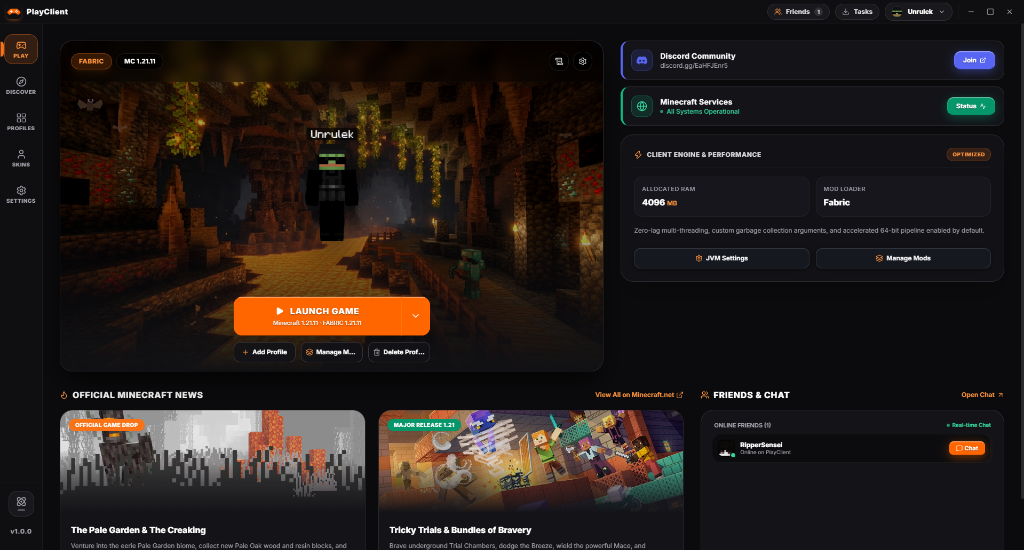
- Optimized engine for max FPS
- One-click mods & modpacks
- Profiles, skins & friends chat
- Official Minecraft news built in

Multi-threading, tuned garbage collection and a 64-bit pipeline are on by default. Play smoother and react faster, with RAM and JVM settings per profile.
Preview skins in 3D, save as many as you want and sync from any Minecraft or NameMC username. Keep every setup in its own profile.
Browse mods, modpacks, shaders and resource packs and install in one click. Fabric and Forge supported, and it all stays organized in one place.
Built from the ground up for speed, control and style.
Multi-threading, tuned garbage collection and a 64-bit pipeline are enabled by default, and you can fine-tune RAM and JVM settings per profile.
Browse thousands of mods, modpacks, shaders, resource packs and data packs, then install in one click. Fabric and Forge both supported.
Create as many profiles as you like, each with its own version, loader and mods. Sort, filter and launch instantly.
Preview your skin in 3D, save as many as you want, and sync instantly from any Minecraft or NameMC username.
Click the image to enlarge.
PlayLaunch your game in one click with live news and server status.
Two players who wanted a launcher that finally felt right.
Quick answers to common questions.
Yes. PlayClient is completely free to download and use.
Windows 10 and 11 (64-bit) only for now.
Yes. A legitimate Minecraft: Java Edition account is required. We do not support piracy.
Fabric and Forge, plus vanilla profiles.
2–4 GB for vanilla or light Fabric; 6–8 GB for large modpacks. Change it per profile in JVM Settings.
Update Java and graphics drivers, lower allocated RAM, disable recently added mods, then ask in our Discord with your logs.
No. PlayClient is independent. Minecraft is a trademark of Mojang Studios / Microsoft.
New apps often trigger SmartScreen until they build reputation. Download only from this website, then choose “More info → Run anyway”.
Keep PlayClient and its community great for everyone.
PlayClient is provided “as is” without warranty. You are responsible for the mods and content you install and for complying with Minecraft's EULA. Do not redistribute modified versions of PlayClient or claim it as your own. We may update the software and these terms at any time.
Only what's needed to run the launcher: your Minecraft username, selected skin and friend/chat data when you use those features. We never sell your data.
Sign-in uses official Microsoft/Mojang services. We never see or store your password.
Uninstall the app to remove local data. For account or data requests, contact us on Discord.
